
Asking a question
/ask answers only from the knowledge base: if the knowledge base does not cover the question, Odin says so instead of guessing and offers the member a way to reach staff (a ticket or modmail button, depending on how your server takes support requests).
To let /ask also answer general questions from Odin’s own knowledge, turn on Allow general knowledge in . Facts about your server (links, rates, commands, staff) still only come from the knowledge base.
By default, /ask is available to all members. Access can be restricted in the permissions configuration.
Knowledge base
The knowledge base is the set of documents Odin uses to answer questions. Navigate to in the dashboard to manage it.Adding documents
Click Add Document and paste in the content or upload a file. Each document should cover a specific topic - server rules, a FAQ, integration guides, or any structured content you want Odin to reference. Supported formats:- Plain text
- Markdown
- Common document formats
Importing from the web
Instead of pasting content, you can bring pages in straight from a website:- Import URLs fetches the pages you list, one per line, and tidies each into its own entry.
- Deep Crawl follows the links on a site, up to the page limit you set, and imports every page with real content.
Keeping entries up to date
Odin re-checks every imported page once a week. If the page has not changed, nothing happens and no tokens are used. If it has, the entry is updated from the page, using this server’s AI tokens for the pages that need tidying. If the AI cannot tidy the new version, for example because the server is out of AI tokens, the entry is left exactly as it was and tried again later, rather than replaced with untidied page text. The page lists this separately as Knowledgebase Upkeep. Turn it off with Keep imported pages up to date at the bottom of the page.- Your edits are kept. Once you edit an entry’s content by hand, Odin never copies the page over it. If the page changes afterwards, the entry is marked Page changed since your edit, and you choose Replace with new version or Keep my version.
- Removed pages are flagged, never deleted. An entry whose page returns “not found” is marked Page missing. After two weekly checks in a row it is left out of answers, so Odin stops quoting a page the site took down. It comes back on its own if the page returns. To keep using it anyway, edit the entry and clear its source URL.
- Watch a site for new pages. Every deep-crawled site is listed under Crawled sites. Turn on its watch toggle and Odin crawls it weekly and imports up to 25 pages that are not in the knowledge base yet. Finding pages costs no tokens; tidying up each new one does. A page the AI finds nothing worth keeping on, such as a login page, is remembered and not looked at again until its content changes.
- Pages that change on every visit are checked less often. Some pages change every time they are loaded, for example because they show the current time. After three weekly checks in a row that found a change, the gap between checks doubles each time, up to every eight weeks, so such a page does not cost tokens every week.
An entry the AI built out of several pages at once is marked Not updated automatically, because re-reading one of its pages would replace it with a fraction of itself. Re-crawl the site to update it.
Managing documents
The page lists all documents with their creation date and status. You can:- Edit a document’s content if information changes
- Delete a document to stop Odin referencing it
- Preview how Odin interprets and summarises the document
Conversation context
Odin maintains context within a conversation session. When a member asks a follow-up question, Odin uses the previous exchanges in the same session to understand the reference. Context is scoped to the individual member and expires after a period of inactivity. Staff can read past conversations in , which is useful for debugging an unexpected response.Configuration
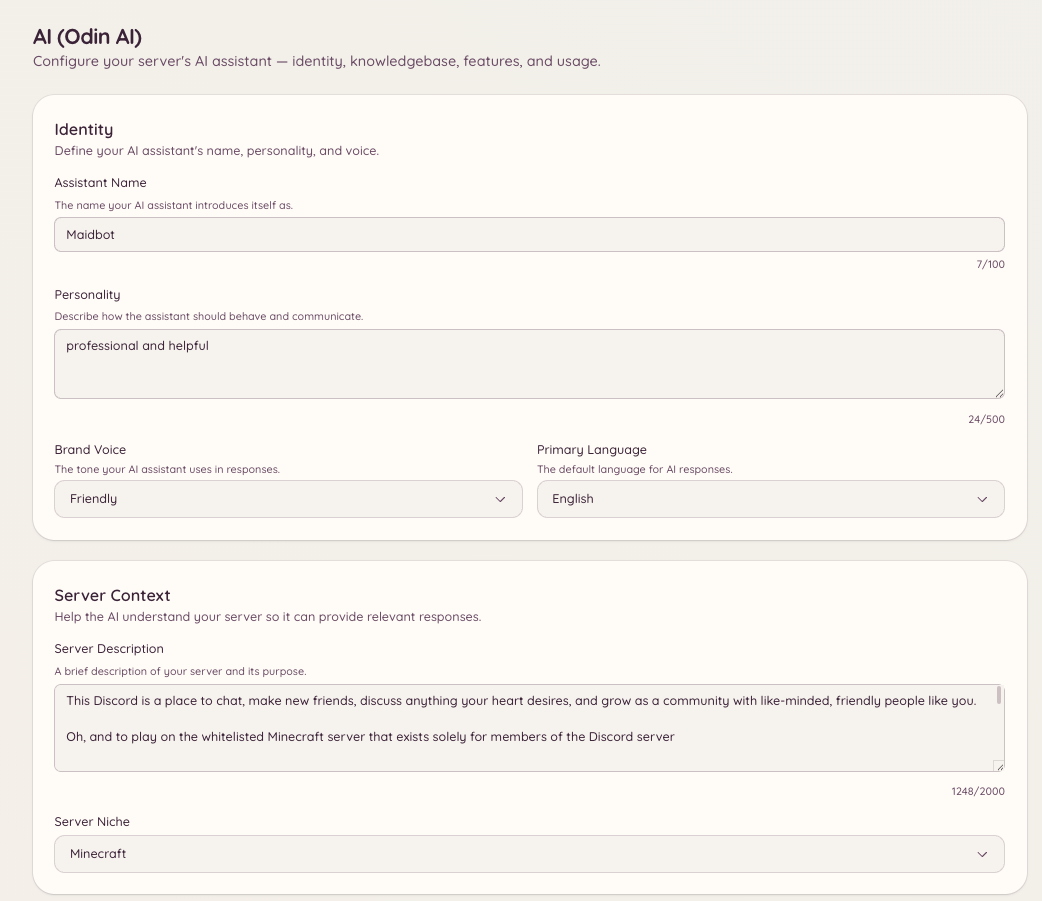
Navigate to in the dashboard to set:
To limit which channels
/ask works in, or set its cooldowns, use .
Features
Navigate to to see and enable the individual AI capabilities available on your server. Each feature is a distinct behaviour that Odin can perform.Text Moderation
Odin can evaluate every message in configured channels and flag or remove content that violates your rules. Unlike regex-based automod, text moderation understands context - it can distinguish between discussing a topic and actually violating a rule about it. Configure which channels are monitored, what the AI looks for, and what action to take (flag for review, delete, or warn) in .Recommended settings
Text moderation starts from a set of recommended settings that we maintain and improve over time. Every setting you leave alone follows the recommendation, so when we publish a better version your server picks it up automatically. A setting you change becomes yours and is marked Custom. It keeps your value when the recommendations change. Press Use recommended next to it to go back to following the recommendation. When a new version changes a setting you have customised, the New recommendations card lists it. For each one you can Use recommended or Keep mine. Heimdall also posts a one-time notice in your escalation channel so the change does not go unnoticed.Feedback and improving the recommendations
Every AI escalation in your log channel has 👍 and 👎 buttons, plus a comment button. Use them to tell Odin when a decision was right or wrong. That feedback is how the recommended settings get better. To improve the recommendations for every server, feedback is collected centrally together with the decision it is about. Before anything leaves your server, mentions, user IDs and the author’s names are removed from the message, and the author is identified only by a one-way code that cannot be turned back into a Discord ID. Messages that raise a wellbeing or self-harm concern are never sent. Feedback is kept for up to 24 months.Servers using their own OpenRouter key can opt out under Improving recommended settings on the page. Opting out also deletes the feedback your server has already sent. Servers on Heimdall’s managed AI cannot opt out, because the recommendations they rely on are built from this feedback.
Image Moderation
When enabled, Odin analyses images attached to messages in monitored channels. Configure sensitivity thresholds and the action to take when a rule violation is detected in .Ticket Auto-Reply
When a ticket is opened, Odin reads the opening message against your knowledge base and posts a suggested answer in the thread for staff to review before sending. This reduces the number of tickets staff need to respond to manually and cuts response times for common questions. Enable and configure this in or in the section.Modmail Assistant
The same capability as ticket auto-reply, applied to incoming modmail conversations. When a member opens a modmail thread, Odin suggests a reply based on the opening DM and your knowledge base. Enable and configure this in or in the section.Q&A Bot
The Q&A Bot monitors configured channels and responds to questions automatically without requiring members to use the/ask command. When a message looks like a question, Odin evaluates it against your knowledge base and replies if it finds a confident answer.
This is distinct from auto-responses - the Q&A Bot uses full AI reasoning rather than pattern matching, and only replies when sufficiently confident. Configure the channels it monitors and the confidence threshold in .
Conversation Modes
Conversation modes let you configure how Odin behaves in specific channels - for example, setting up a channel where Odin maintains ongoing conversation context and acts as a persistent assistant. Configure available modes and the channels they apply to in . Each mode has two settings that decide how it answers:- Allow general knowledge (on by default). Odin answers general questions, such as the game or topic your community is about, from its own knowledge, and uses your knowledge base for anything about your server. It says when it is unsure, and points out where your server may differ from the general case. Facts about your server itself, such as links, rates, commands and staff, still only come from the knowledge base. Turn this off to make the mode answer only from the knowledge base, like
/askdoes by default. - Handoff action. What happens when a member asks for a human or needs something only staff can do. Ordinary questions are always answered, never handed off.
- No hand-off (default): Odin says it cannot help and stops there.
- Open a ticket: Odin shows your server’s ticket button, or modmail’s if you use modmail instead.
- Ping a staff role: Odin mentions the role you choose. Each member can ping it at most once every 10 minutes, and the role is pinged at most once a minute; later hand-offs name the role without notifying it. The role must be mentionable, or Heimdall needs the Mention @everyone, @here, and All Roles permission. Otherwise the mode behaves as No hand-off.
Moderation Logs
shows a log of AI moderation actions - text and image moderation events, what was flagged, and what action was taken. Use this to review the AI’s decisions and tune your configuration if it is being too aggressive or too permissive.Conversations
is a log of members’ conversations with Odin. Staff can open a conversation to read it, flag it or mark it reviewed, add a good answer to the knowledge base, or restrict the member from AI features.Restrictions
lists members who are banned or timed out from using AI features, and lets staff add or lift those restrictions. Limiting/ask to specific channels, and its cooldowns, is on instead. Without a channel limit, /ask is available in every channel.
Usage and billing
shows your server’s AI token consumption over time - broken down by feature (Q&A, moderation, ticket auto-reply, etc.) and by day. This is useful for understanding which features are consuming the most tokens. shows your current AI credit balance and allows purchasing additional credits. AI features consume credits per token processed; the exact cost depends on which underlying model is configured for your deployment.Usage and Billing are only visible if your Heimdall deployment uses token-based AI credits. Self-hosted deployments using a local model or their own API key will not see these sections.
AI in other plugins
Odin integrates with tickets, modmail, and suggestions:- - enable ticket auto-reply for specific ticket categories
- - enable the modmail assistant for specific modmail categories
- Suggestions - Odin automatically generates a concise title when a member submits a suggestion, if AI Titles is on for the suggestion’s category in . A suggestion with no category never gets one. On Heimdall’s managed AI, Suggestion Titles must also be on in