
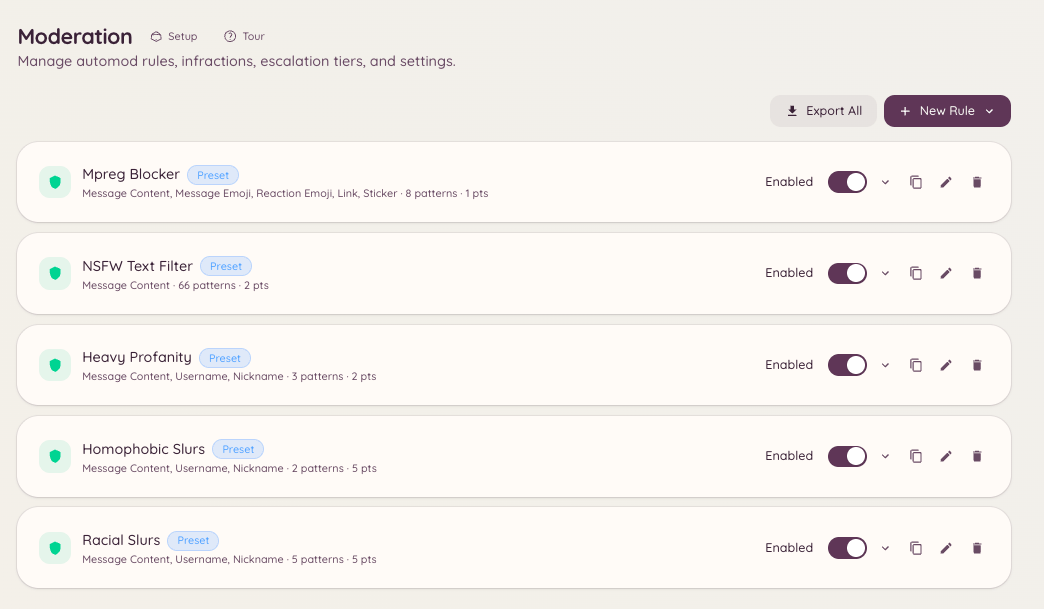
Automod lets you define rules that the bot evaluates against every message in your server. When a message matches a rule, the bot can delete it, warn the sender, apply a mute, or any combination of actions you configure. Rules run in the background with no staff involvement required.
Moderation Automod Rules

How rules work

Each rule has a trigger, a set of exemptions, and a response. The trigger defines what pattern the rule looks for. The exemptions define channels, roles, or users the rule should ignore. The response defines what the bot does when the rule fires. Rules are evaluated in order. A single message can match multiple rules, each applying its response independently.

Creating a rule

Navigate to in the dashboard and click New Rule.

Trigger types

Rule actions

Actions can be combined. A common setup is delete + warn, where the message is removed and a warning is added to the member’s infraction record.

Exemptions

You can exempt specific roles, channels, or users from a rule. For example, you might have a link filter that exempts your staff role so that moderators can post links freely.

Point values

When a rule issues a warn action, you can set the point value attached to the infraction. These points feed into the escalation system. See Escalation for how thresholds work.

Testing a rule

After creating a rule, use the Test input at the bottom of the rule editor to verify that a sample message matches (or does not match) as expected. The test runs the rule logic without actually enforcing it.

Rule order and priority

Rules are evaluated top-to-bottom. Drag rules in the list to reorder them. A Stop on match option is available per rule - when enabled, if that rule fires, no further rules are evaluated for the same message.

Required permissions