
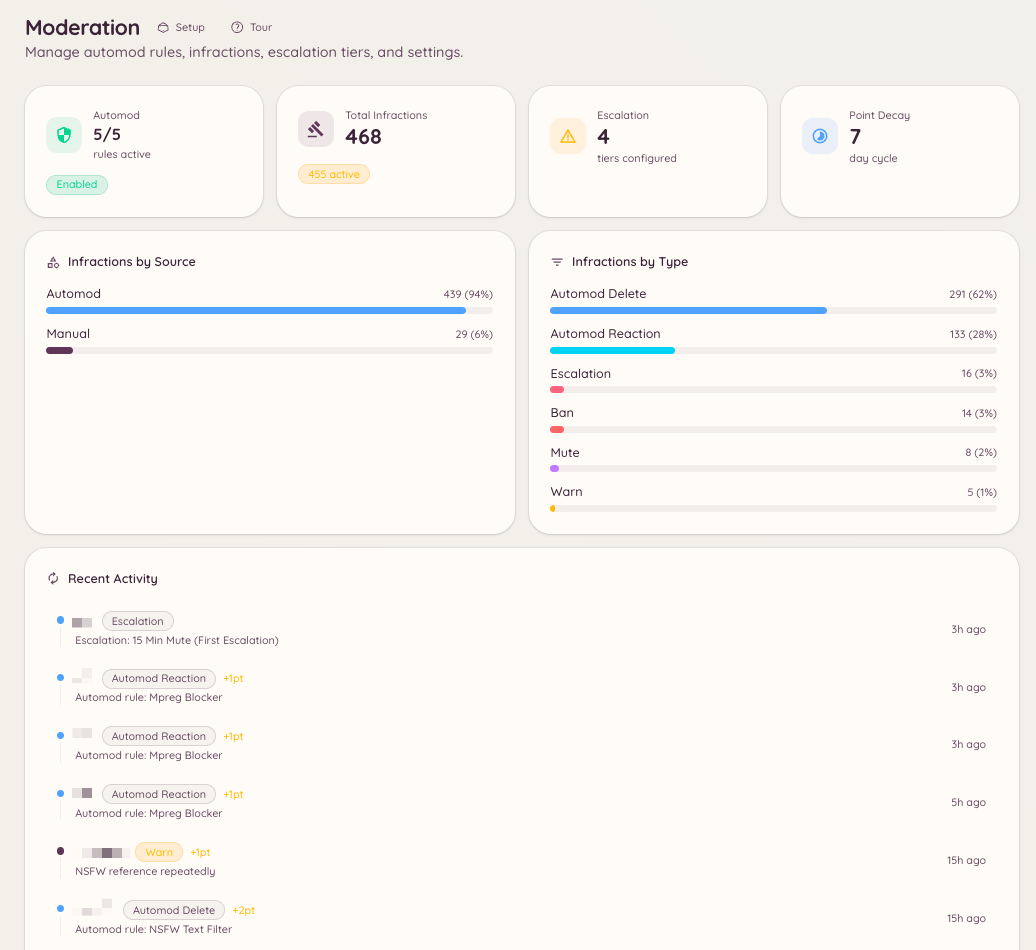
Heimdall’s moderation plugin combines manual enforcement commands, an automated rule engine, progressive escalation, and a full infraction history. All of these components share the same underlying infraction system, which means manual warnings and automatic rule violations accumulate in the same point total and feed into the same escalation thresholds.
Moderation Dashboard

Components

Manual actions

Issue warnings, bans, kicks, mutes, and message purges directly.

Automod rules

Define keyword filters, regex patterns, and content-type rules that enforce automatically.

Escalation

Configure automatic punishments that trigger as a member accumulates infraction points.

Infraction history

View every action taken against a member, including point totals and expiry dates.

Channel controls

Lock channels, apply per-channel bans, and prevent members from leaving and rejoining to evade bans.

Sticky messages

Keep a message pinned to the bottom of a channel automatically.

Appeals

Let banned members request a review through a structured form.

How infractions and points work

Every moderation action - whether taken by a staff member or by automod - creates an infraction record. Each record stores the action type, the reason, the staff member or rule that triggered it, a configurable point value, and an optional expiry. Points accumulate over time. When a member’s total active points cross a threshold you configure in the escalation settings, the bot automatically applies the corresponding punishment. Points expire individually based on each infraction’s expiry period, and as they expire, the member’s total decreases. This means a member who receives multiple minor warnings over a week may trigger an automatic mute, even if no single action crossed a threshold on its own.

Dashboard location

Navigate to in the dashboard sidebar. The moderation section has these pages: , , , , , , , , , and . Infractions are now cases, under , and ban appeals have their own section.

Required permissions

Dashboard access and command usage are both controlled by the Heimdall permission system. Key permission keys for moderation: