
How it works
Every warning, automod violation, and manual infraction assigns a point value. Points are not permanent - each infraction has an expiry period after which its points no longer count toward the member’s total. When a member’s active point total crosses a configured threshold, the bot immediately applies the corresponding punishment. Escalation fires again each time a new infraction pushes the member over a threshold. If a member was previously muted at 10 points and then reaches 20 points, the 20-point action fires - the previous punishment does not reset the threshold.Configuring escalation thresholds
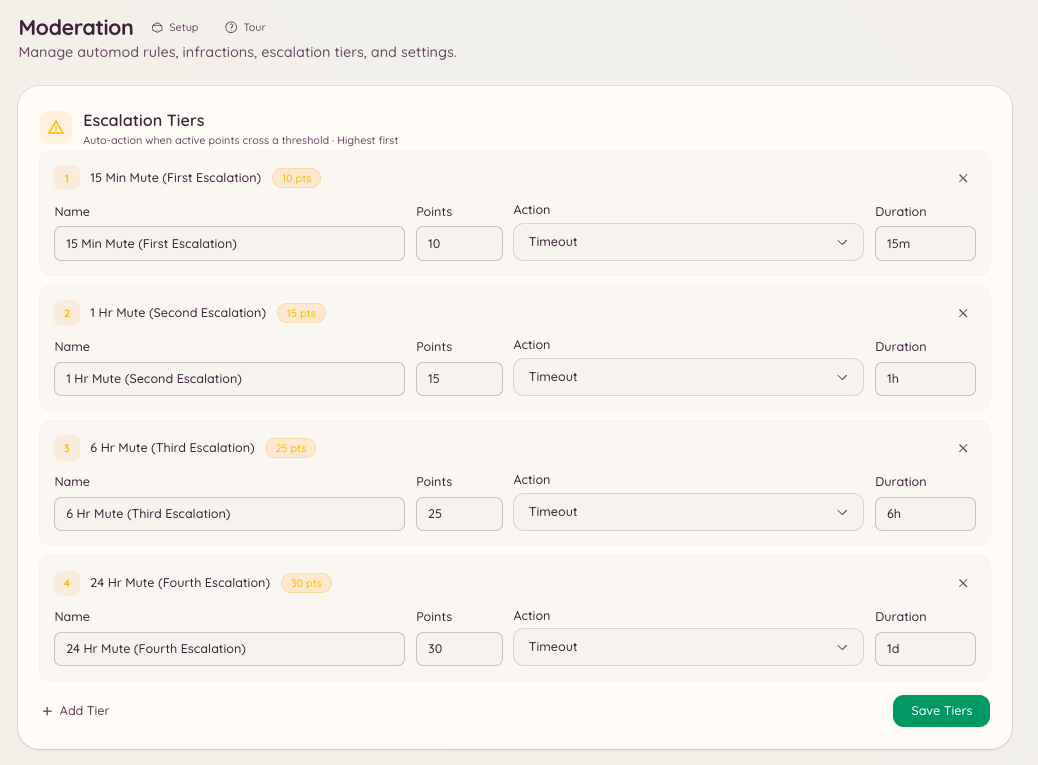
Navigate to in the dashboard and click New Threshold. Each threshold has the following settings:Example configuration
In this example, a member who receives five 1-point warnings within the expiry window is automatically muted for one hour. If they continue accumulating points after the mute expires, the 10-point threshold fires and the mute becomes 24 hours.
Infraction point values
A manual warning is worth 1 point unless the moderator setspoints. Automod rules set their own value in - for example, a serious rule can assign 10 points per violation rather than 1.